Products
Nagios XI - Two Factor Authentication
Overview
This KB article shows you how to enable and use the Two Factor Authentication functionality that was added in Nagios XI 5.5.
Two factor authentication adds additional login security to Nagios XI, it requires the end user to provide a token after initially logging into Nagios XI. The token is emailed to the user and will expire after a set amount of time if it is not used.
Enable Two Factor Authentication
In Nagios XI login as an administrative account and navigate to Admin > System Config > System Settings . On the Security tab you will find the two factor authentication settings.
The settings are explained as follows:
- Enable Two Factor Auth
- This box needs to be checked for the functionality to be enabled
- Two Factor Token Timeout
- This setting defines how long the token will remain active before it expires
- Two Factor Cookie
- Enabling this feature allows the end user to store a cookie on their computer that will not prompt them for the two factor token when they login
- This is provided as a checkbox on end user's the token input screen
- Two Factor Cookie Timeout
- This setting defines how long the cookie remains valid before it expires
Click the Update Settings button after making your selections.
Using Two Factor Authentication
Once two factor authentication has been enabled, all users will be prompted with the following screen after logging into Nagios XI:
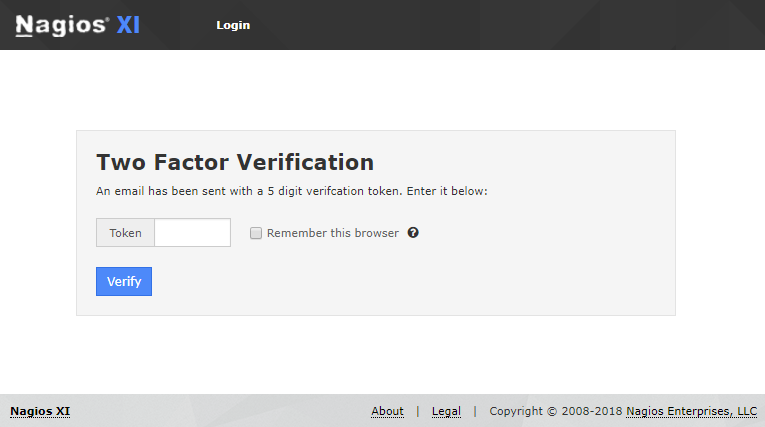
In the screenshot above, the Remember this browser checkbox will only appear if the Two Factor Cookie setting is enabled.
Troubleshooting
For issues regarding logging in using two factor authentication please refer to the following KB article:
Nagios XI - Unable To Login Using Two Factor Authentication
Final Thoughts
For any support related questions please visit the Nagios Support Forums at: