Products
Nagios XI - Link Directly to Graph Explorer Graphs
Purpose
This document describes how to build custom Graph Explorer links so that you may link directly to the graphs in Nagios® XI™.
Target Audience
This document is intended for use by Nagios® XI™ Administrators and Developers wanting to link directly to Graph Explorer graphs by building custom links and is intended for an audience that has some familiarity with programming and HTML.
Obtaining API Ticket Credentials
Here is how you obtain your ticket credentials so that you can build the custom:
Go to Admin > System Extensions > Manage Components.
Click the Edit Settings (wrench and screwdriver) icon on the Backend API URL component:

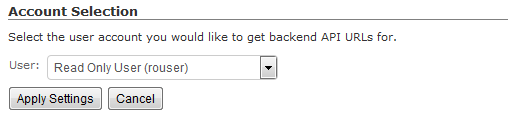
Select the User that you want to use from the dropdown and click Apply Settings, we recommended that you use a read-only user for better security:
Copy the last 2 sections of one of the URLs given (any one will work), you will use this information to build your custom links:

Building Custom Graph Explorer Links
Here are the variables that you must replace in order to build your custom Graph Explorer links:
- XISERVER - The hostname/IP address of your Nagios® XI™ server.
- HOST - The host that you want to view graphs for.
- SERVICE - The service that you want to view graphs for.
- WIDTH - The width of the graph that you want to be displayed.
- HEIGHT - The height of the graph that you want to be displayed.
- USERNAME - The username that you are using to login to Nagios® XI™.
- TICKET - The ticket number that is used for allowing accessing to the background API.
Custom Link Format for Host Graph - Default Size
http://XISERVER/nagiosxi/includes/components/graphexplorer/graph.php?host=HOST&username=USERNAME&ticket=TICKET
Custom Link Format for Service Graph - Default Size
http://XISERVER/nagiosxi/includes/components/graphexplorer/graph.php?host=HOST&service=SERVICE&username=USERNAME&ticket=TICKET
Custom Link Format for Host Graph - Custom Size
http://XISERVER/nagiosxi/includes/components/graphexplorer/graph.php?host=HOST&width=WIDTH&height=HEIGHT&username=USERNAME&ticket=TICKET
Custom Link Format for Service Graph - Custom Size
http://XISERVER/nagiosxi/includes/components/graphexplorer/graph.php?host=HOST&service=SERVICE&width=WIDTH&height=HEIGHT&username=USERNAME&ticket=TICKET
Examples
Host Graph
http://10.107.243.25/nagiosxi/includes/components/graphexplorer/graph.php?host=localhost&width=900&height=400&username=nagiosadmin&ticket=5o5bejjc
Service Graph
http://10.107.243.25/nagiosxi/includes/components/graphexplorer/graph.php?host=localhost&service=PING&width=900&height=400&username=nagiosadmin&ticket=5o5bejjc
Final Thoughts
For any support related questions please visit the Nagios Support Forums at: