Library

Docs
Beta

Products

Adding Additional Instances To ClusterAlerting On Log EventsAnalyzing LogsAuthenticating and Importing Users with AD and LDAPChanging Data Store PathConfiguring FiltersConfiguring InputsConfiguring Multi Tenancy in Nagios Log ServerConfiguring NXLog To Send Additional Log FilesCreating a Log Server DashboardForwarding Logs from Nagios Log Server to Another DestinationHow To Configure NXLog To Send Multi line Logs To Nagios Log Server.How To Configure Windows To Send Logs To Nagios Log ServerHow To Create A Nagios Log Server Instance In The Amazon EC2 CloudHow To Export Or Schedule Reports In Nagios Log ServerHow To integrate Nagios Log Server with XIHow to Backup and Restore the Nagios Log ServerHow to use a Proxy Server with Nagios Log ServerIntegrating Nagios Log Server with Nagios XILog Server Dashboard OverviewManaging ClustersManaging IndicesManaging Snapshots and MaintenanceMonitoring A New Log SourceMonitoring Apache Logs with Nagios Log ServerMonitoring Linux System Logs using Nagios Log ServerMonitoring Squid Proxy Server With Nagios Log ServerNagios Log Server Adding Additional Instances To ClusterNagios Log Server Administrator GuideNagios Log Server Alerting On Log EventsNagios Log Server Analyzing LogsNagios Log Server Architecture and Overview NWC15Nagios Log Server Changing Data Store PathNagios Log Server Cluster Timezone SettingsNagios Log Server Configuration OverviewNagios Log Server Configuring Input FiltersNagios Log Server Configuring InputsNagios Log Server Configuring NXLog To Send Additional Log FilesNagios Log Server Configuring NXLog To Send Multi Line Log FilesNagios Log Server Conversion for VirtualBoxNagios Log Server Custom Alert Message Email TemplateNagios Log Server Data Backup and ArchivingNagios Log Server ELK documentationNagios Log Server ESXi Syslog ConfigNagios Log Server Exporting Log DataNagios Log Server Full Architecture OverviewNagios Log Server How To Configure SSLNagios Log Server How To Create A Nagios Log Server Instance In The Amazon EC2 Cloud EnvironmentNagios Log Server How To Install Using VMwareNagios Log Server How To Select A DownloadNagios Log Server Important Files And DirectoriesNagios Log Server Introduction WebinarNagios Log Server Jobs Subsystem ArchitectureNagios Log Server License EntitlementsNagios Log Server Listening On Privileged PortsNagios Log Server Log Monitoring and Log Management with Nagios NWC14Nagios Log Server Logging InNagios Log Server Managing ClustersNagios Log Server Managing IndicesNagios Log Server Managing InstancesNagios Log Server Managing Snapshots and MaintenanceNagios Log Server Managing UsersNagios Log Server Monitor Your Log Server InstancesNagios Log Server Monitoring A New Log SourceNagios Log Server Offline UpgradeNagios Log Server Overview And TerminologyNagios Log Server Performance And Storage WalkthroughNagios Log Server Poller Subsystem ArchitectureNagios Log Server Real Life Experience of Nagios Log Server NWC15Nagios Log Server Removing An Instance From A ClusterNagios Log Server Sending Multiline Log Files Using SyslogNagios Log Server Sending NXLogs With SSLNagios Log Server Sending Nagios Core Logs To Nagios Log ServerNagios Log Server Sending syslog with SSL/TLSNagios Log Server Single Instance DeploymentNagios Log Server Updating Logstash PatternsNagios Log Server Upgrade InstructionsNagios Log Server Using An Output To Create Nagios XI Passive ObjectsNagios Log Server Using GeoIP DataNagios Log Server Using The Custom Includes PageRemoving An Instance From A ClusterSend Alerts Based on the Log Server Audit LogSending ESXi Logs To Nagios Log ServerSending Mac OS X Logs To Nagios Log ServerSending NXLogs With SSL/TLSSending Nagios Core Logs To Nagios Log ServerSending syslog With SSL/TLSUpgrade Nagios Log ServerUsing An Output To Create Nagios XI Passive ObjectsWaiting for Database StartupNagios Log Server Monitoring Using NCPA + Nagios XI

Nagios Log Server - Jobs Subsystem Architecture

Jobs Subsystem Overview

The jobs subsystem of Nagios Log Server runs on every Log Server instance, and is responsible for running jobs that are scheduled to run. Jobs can be scheduled to run on a specific instance (local jobs) or they can be run on any single instance (global jobs). Additionally, a job can be schedule to run just once, or it can be scheduled to run on a given frequency, e.g. daily, hourly, etc.

Example Jobs

  • Local
    • apply_config - Job is scheduled for EACH instance (via instance jobs) to create config snapshot, write logstash configs, restart logstash

    • change_timezone - Changes the timezone on the local instance

    • create_snapshot - creates a config snapshot

    • delete_snapshot - deletes a config snapshot

    • restore_snapshot - restores a config snapshot

    • stop_service - stops a specific service on the local instance

    • start_service - starts a specific service on the local instance

    • restart_service - restarts specific service on the local instance

  • Global
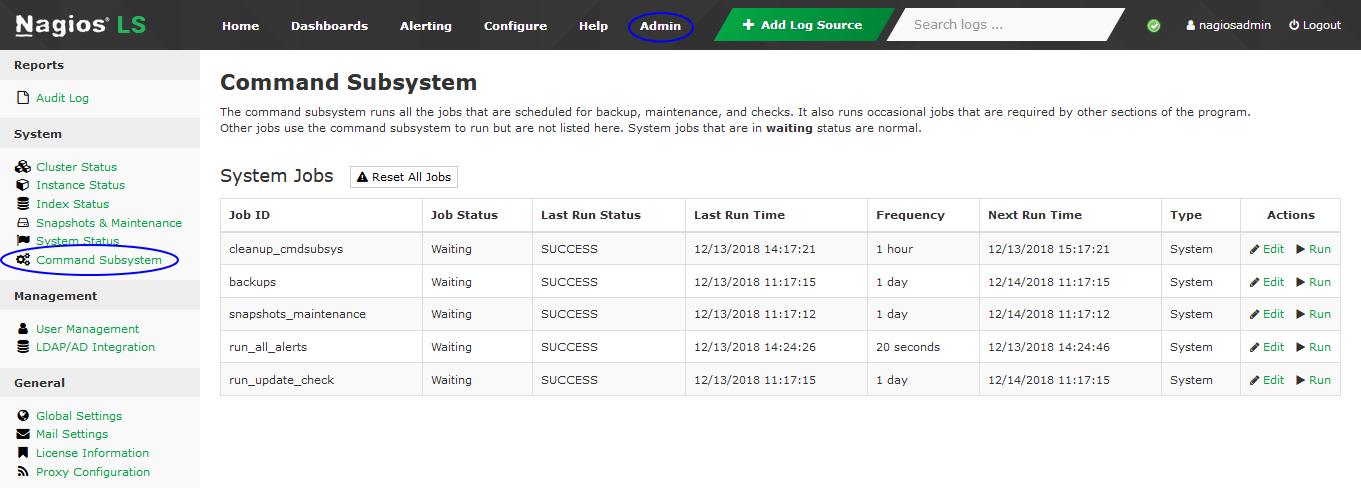
    • run_alerts - Runs every 20 seconds to send alerts

    • backup_maintenance- Runs every day to perform index maintenance and backups

    • cleanup - deletes old completed tasks from the jobs queue more than 1 day old

Many global jobs are able to be run from the Admin > System > Command Subsystem page:
Architecture Components And Execution Flow

The jobs subsystem starts every minute via a cron located at /etc/cron.d/nagioslogserver and runs as the nagios user:

This cron executes a loop that runs every 5 seconds to perform the following actions:

  1. Query the elasticsearch index to get a list of local jobs scheduled to be executed this instance.

    1. Execute function in command field

    2. Update the Audit Report with results _type = JOBS

  2. Query the elasticsearch index to get a list of global jobs that need to be executed.

    1. Execute function in command field

    2. Update the Audit Report with results _type = JOBS

NOTE: Global jobs are jobs that ANY instance may process, they are NOT executed by all instances.

The general flow of execution of the jobs subsystem works as follows:

  1. The jobs.php controller runs as a background process and executes the commands in the process_jobs() method. The jobs.php script is located at /var/www/html/nagioslogserver/application/controllers/jobs.php and runs under cron every minute. The cron job is defined in /etc/cron.d/nagioslogserver

  2. The jobs.php script executes the functions listed in the process_jobs() method, and the functions will be located in the cmdsubsys_helper.php located at /var/www/html/nagioslogserver/application/helpers/cmdsubsys_helper.php

  3. The poller cron saves output of the run in /var/www/html/nagioslogserver/var/jobs.log

Troubleshooting Problems

Some potential problems with the jobs subsystem, as well as troubleshooting information are listed below:

Problem: Daily Backups are not being processes or alerts are not being run on designated interval

Potential Causes:

  • The jobs scripts may not be running. Run the following from the command line to see if the script is running:

    •   ps axuw | grep jobs
      
  • There may be a problem with the cron job. Check the cron file /etc/cron.d/nagioslogserver to ensure the job is not commented out. Execute the following from the command line to look for possible errors:

    •   tail /var/log/cron
      
  • Check the /usr/local/nagioslogserver/var/jobs.log log file for errors

  • The nagios user account could be expired - you can check this with the following from the command line:

    •   chage -l nagios
      

Final Thoughts

For any support related questions please visit the Nagios Support Forums at:

http://support.nagios.com/forum/

Nagios Enterprises, LLC

© All rights reserved. 2026